Top 25 most-starred native Mac apps on GitHub
Native Mac apps are faster and lighter than Electron ones. Here are the 25 most-starred from five GitHub lists, plus 10 closed-source favorites.
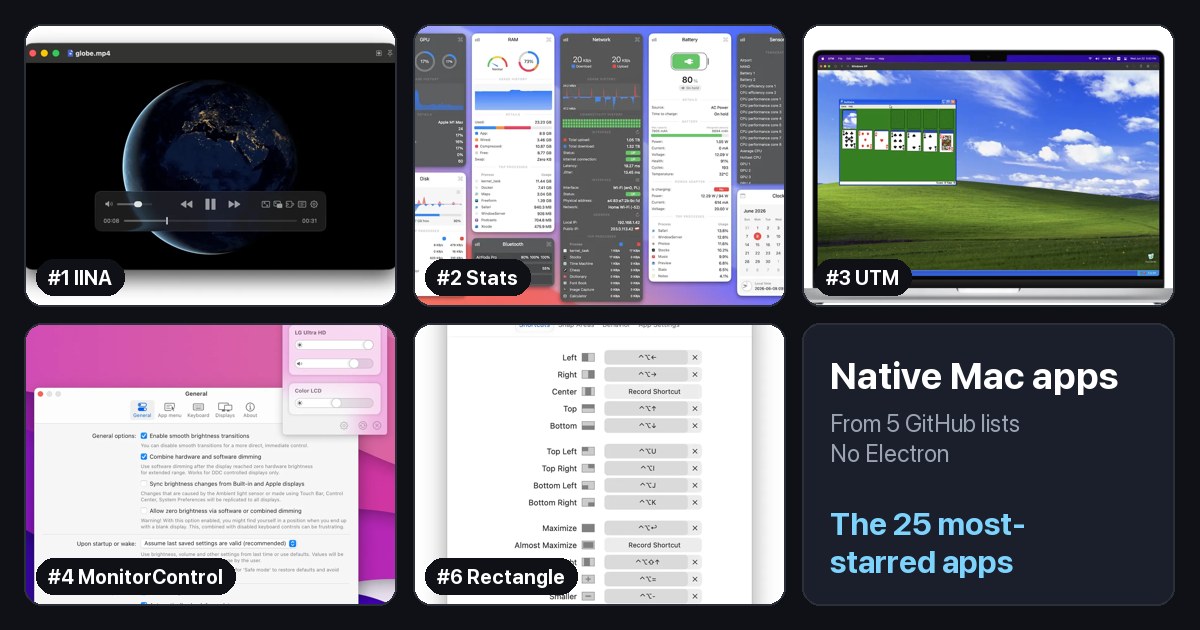
Some Mac apps feel instant. They open in a blink, barely touch your battery, and behave exactly like the apps Apple makes. Others feel like a website in a window. The difference is usually whether the app is native.
I went through five GitHub lists that track native Mac apps and pulled out the 25 most-starred ones.
What makes an app native?
A native Mac app is built with Apple's own tools: the Swift or Objective-C programming languages and Apple's AppKit or SwiftUI frameworks. Many popular apps, like Slack, Discord, and VS Code, are instead built with Electron, which packs a copy of the Chrome browser inside the app.
Electron makes it easy to ship one app for Mac, Windows, and Linux, but it has a cost. Native apps usually:
- Start faster and feel more responsive.
- Use less memory and battery, which matters on a MacBook.
- Behave like a Mac app, with the right menus, shortcuts, settings, and features like Quick Look and Shortcuts.
If you just moved from Windows, choosing native apps is one of the easiest ways to get the most out of your Mac.
At a glance
| # | App | Category | Stars | Lists |
|---|---|---|---|---|
| 1 | IINA | Video & Media | 47k | 3 of 5 |
| 2 | Stats | System Utilities | 42k | 3 of 5 |
| 3 | UTM | Virtualization | 36k | 1 of 5 |
| 4 | MonitorControl | System Utilities | 34k | 3 of 5 |
| 5 | ShadowsocksX-NG | VPN & Proxy | 33k | 2 of 5 |
| 6 | Rectangle | Window Management | 30k | 3 of 5 |
| 7 | Ice | Menu Bar | 30k | 2 of 5 |
| 8 | yabai | Window Management | 30k | 2 of 5 |
| 9 | cmux | Terminal | 28k | 1 of 5 |
| 10 | HandBrake | Video & Media | 25k | 2 of 5 |
| 11 | Vorssaint Utils | Menu Bar | 24k | 2 of 5 |
| 12 | AeroSpace | Window Management | 23k | 1 of 5 |
| 13 | CodeEdit | Code Editors | 23k | 3 of 5 |
| 14 | CodexBar | AI Tools | 22k | 1 of 5 |
| 15 | Maccy | Clipboard | 22k | 3 of 5 |
| 16 | Mos | Mouse & Trackpad | 22k | 2 of 5 |
| 17 | Aerial | Screen Saver | 21k | 2 of 5 |
| 18 | VLC | Video & Media | 20k | 1 of 5 |
| 19 | Background Music | Audio | 19k | 1 of 5 |
| 20 | iTerm2 | Terminal | 18k | 2 of 5 |
| 21 | OpenEmu | Games | 18k | 2 of 5 |
| 22 | AltTab | Window Management | 16k | 2 of 5 |
| 23 | Amethyst | Window Management | 16k | 3 of 5 |
| 24 | Hammerspoon | Automation | 16k | 1 of 5 |
| 25 | Hidden Bar | Menu Bar | 15k | 3 of 5 |
Where this list comes from
Five GitHub lists, combined:
- awesome-native-macosx-apps (⭐ 1.6k): about 220 native apps, each marked free, paid, freemium, or open source.
- awesome-swift-macos-apps (⭐ 1.7k): more than 1,200 open-source Mac apps written in Swift, from the maintainer of awesome-mac.
- jeffreyjackson/mac-apps (⭐ 1.6k): an older list of open-source Mac apps, started in 2015.
- awesome-mac (⭐ 115k): the biggest Mac app list, which marks native apps with a badge.
- open-source-mac-os-apps (⭐ 51k): shows each app's programming language, so I included the apps written in Swift or Objective-C.
Together that is about 1,500 apps. To keep only real native apps, I checked each app's main programming language on GitHub and kept the ones written in Swift or Objective-C. A few apps with a native Mac interface but a different core language, like HandBrake and VLC, count too. Apps that some lists call native but are not, like Electron and Java apps, are left out.
The 25 most-starred native Mac apps
Then I ranked them by GitHub stars, leaving out command-line tools, code libraries, and archived projects. Each app shows its category, its stars, and which of the five lists include it. The more lists an app appears in, the more people agree it is worth installing. All 25 are free and open source. Star counts are as of October 2026.
1. IINA
Video & Media · ⭐ 47k
In 3 of 5 lists: awesome-native-macosx-apps, awesome-swift-macos-apps, open-source-mac-os-apps
IINA is the video player the Mac should have shipped with. It plays almost any format, handles subtitles well, and looks like a modern Mac app, with picture-in-picture and trackpad gestures. If you used VLC on Windows, try IINA first.
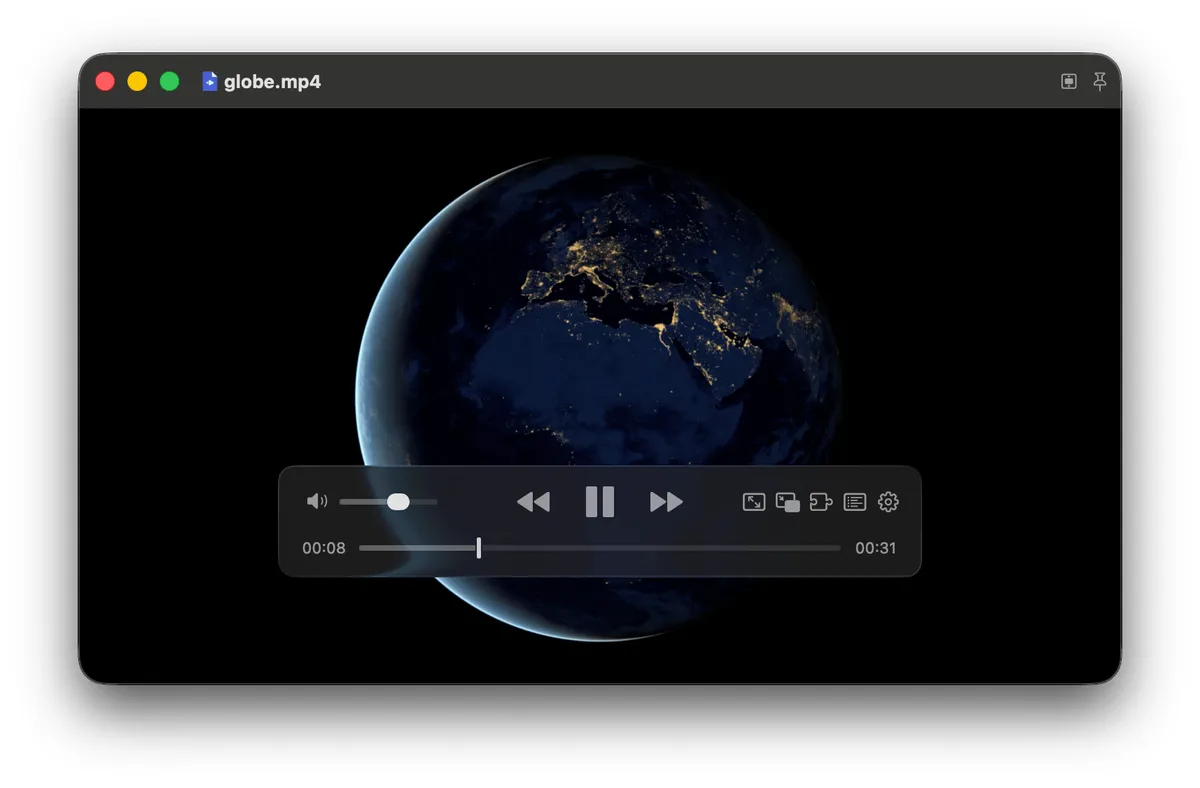
Screenshot: iina.io. Get it at iina.io · GitHub
2. Stats
System Utilities · ⭐ 42k
In 3 of 5 lists: awesome-native-macosx-apps, awesome-swift-macos-apps, open-source-mac-os-apps
Stats is the closest thing to Task Manager in your menu bar. It shows CPU, memory, disk, network, battery, and temperatures at a glance, and clicking each one opens a detailed panel. It is free and very light.
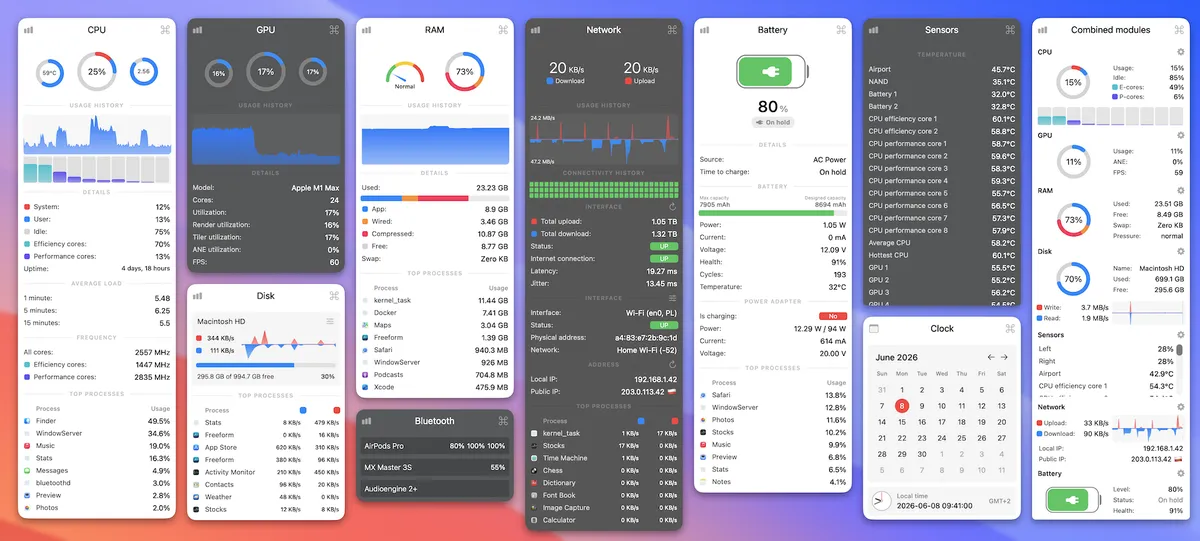
Screenshot: mac-stats.com. Get it at mac-stats.com · GitHub
3. UTM
Virtualization · ⭐ 36k
In 1 of 5 lists: awesome-swift-macos-apps
UTM runs other operating systems inside a window on your Mac. Keep a copy of Windows 11 or Linux around for that one app you still need. It is free from the website, and there is a paid App Store version if you want to support the developers.
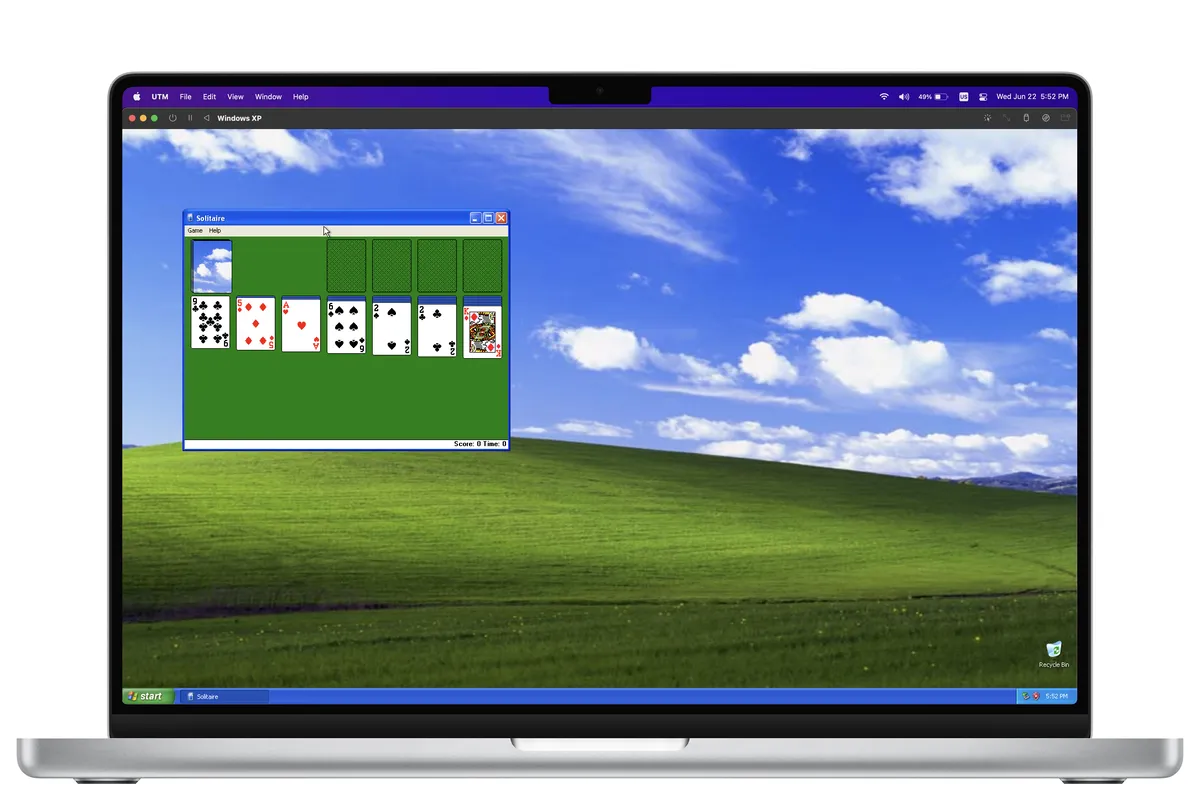
Screenshot: UTM on GitHub. Get it at mac.getutm.app · GitHub
4. MonitorControl
System Utilities · ⭐ 34k
In 3 of 5 lists: awesome-native-macosx-apps, awesome-swift-macos-apps, open-source-mac-os-apps
Your Mac's brightness and volume keys only work on Apple displays. MonitorControl makes them work on most external monitors too, with the same on-screen indicator you get on Apple displays. If you use an external monitor, install this.
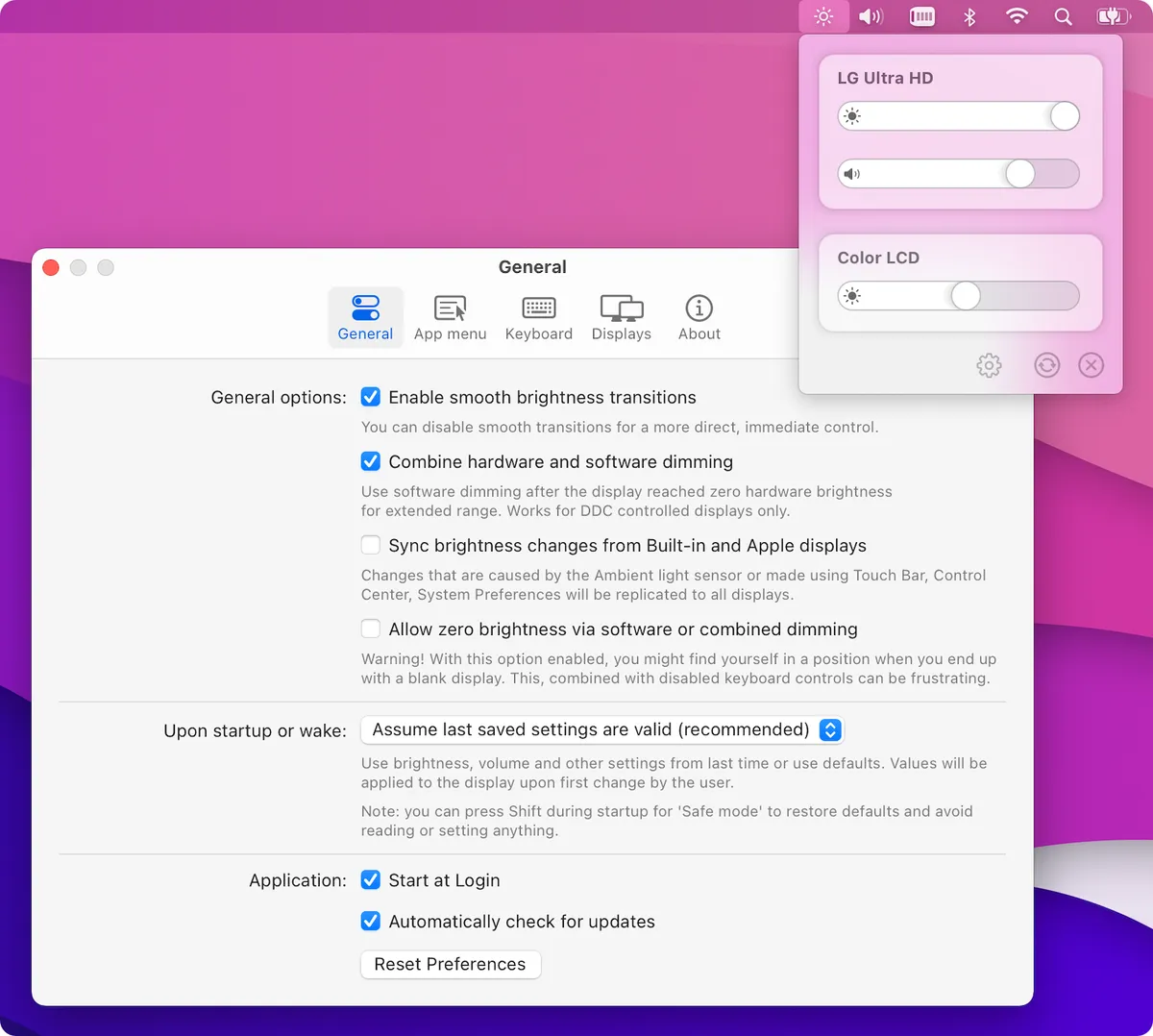
Screenshot: MonitorControl on GitHub. Get it at monitorcontrol.app · GitHub
5. ShadowsocksX-NG
VPN & Proxy · ⭐ 33k
In 2 of 5 lists: awesome-swift-macos-apps, open-source-mac-os-apps
ShadowsocksX-NG is a menu bar client for Shadowsocks, a proxy that many people use to get around internet censorship. It is popular in countries with heavy internet restrictions, which explains its star count. Its last update was in 2024.
Get it on GitHub
6. Rectangle
Window Management · ⭐ 30k
In 3 of 5 lists: awesome-native-macosx-apps, awesome-swift-macos-apps, open-source-mac-os-apps
Rectangle brings Windows-style window snapping to the Mac. Drag a window to the edge of the screen, or use a keyboard shortcut, to snap it to half, a quarter, or full screen. Newer versions of macOS have some tiling built in, but Rectangle is still faster and more flexible.
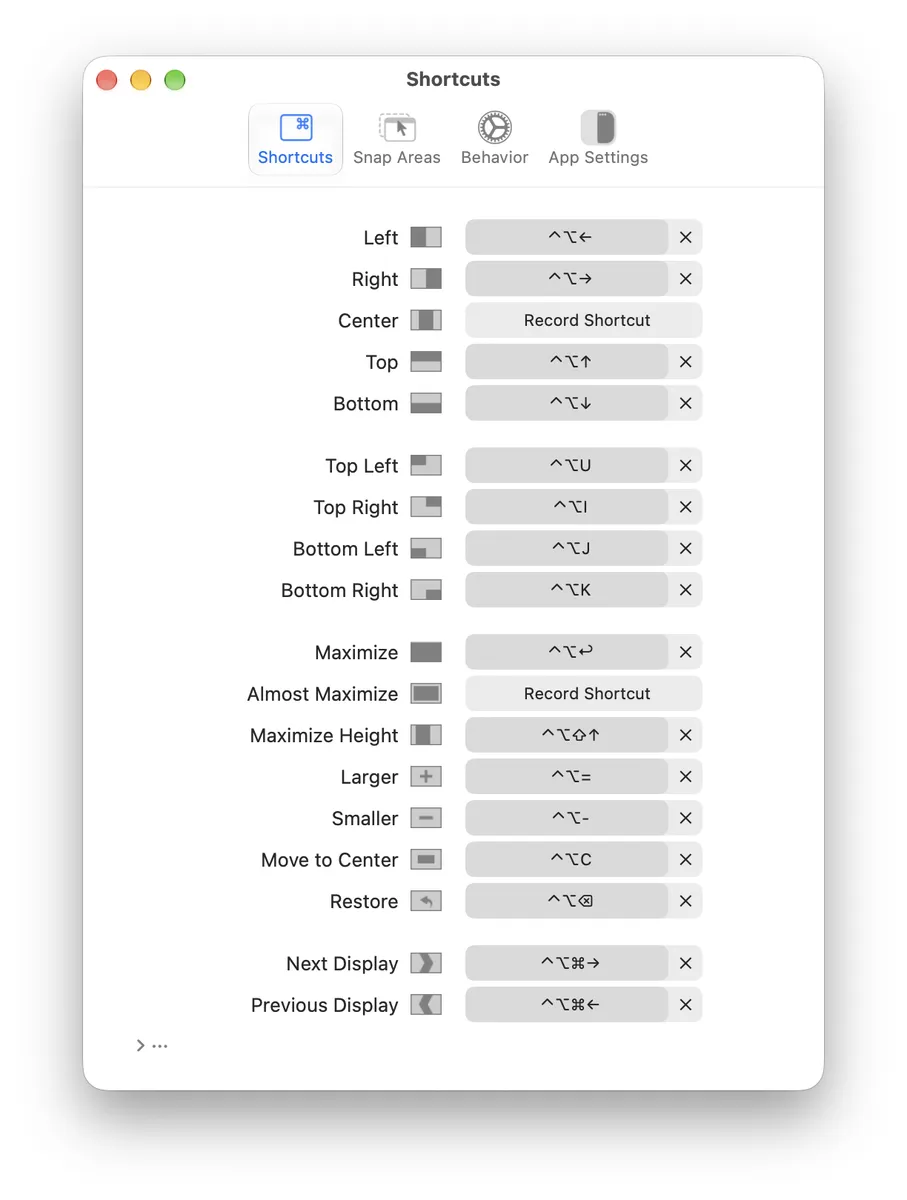
Screenshot: Rectangle on GitHub. Get it at rectangleapp.com · GitHub
7. Ice
Menu Bar · ⭐ 30k
In 2 of 5 lists: awesome-swift-macos-apps, open-source-mac-os-apps
Ice is a free, open-source alternative to Bartender for tidying up your menu bar. Hide icons you rarely use, show them on hover or click, and even give the menu bar a custom look. It has not been updated since September 2025, and a community fork called Thaw continues the work.
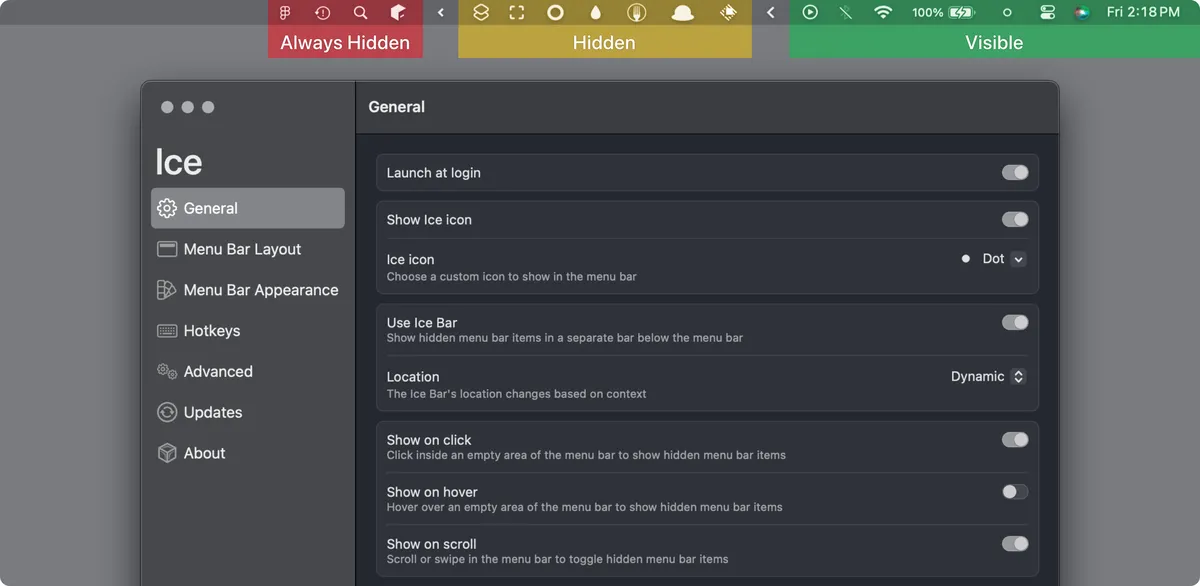
Screenshot: Ice on GitHub. Get it on GitHub
8. yabai
Window Management · ⭐ 30k
In 2 of 5 lists: awesome-native-macosx-apps, open-source-mac-os-apps
yabai is a tiling window manager: it automatically arranges your windows so they never overlap, and you move between them with the keyboard. It is powerful but technical, set up with a config file and usually paired with a hotkey tool. Some features need part of macOS's security protection turned off.
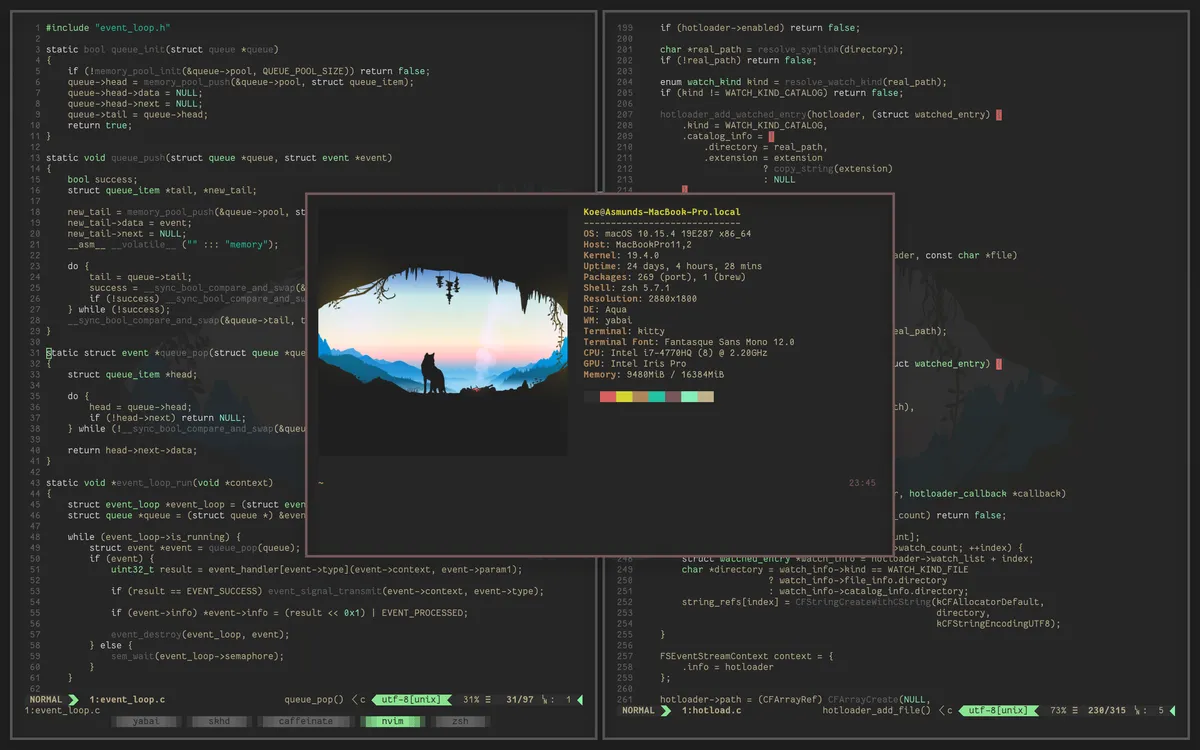
Screenshot: yabai on GitHub. Get it on GitHub
9. cmux
Terminal · ⭐ 28k
In 1 of 5 lists: awesome-swift-macos-apps
cmux is a native terminal built for working with AI coding agents. It uses Ghostty's engine for fast rendering, adds vertical tabs that show each project's Git branch, and highlights a pane when an agent needs your attention. It can even open a built-in browser next to your terminal.
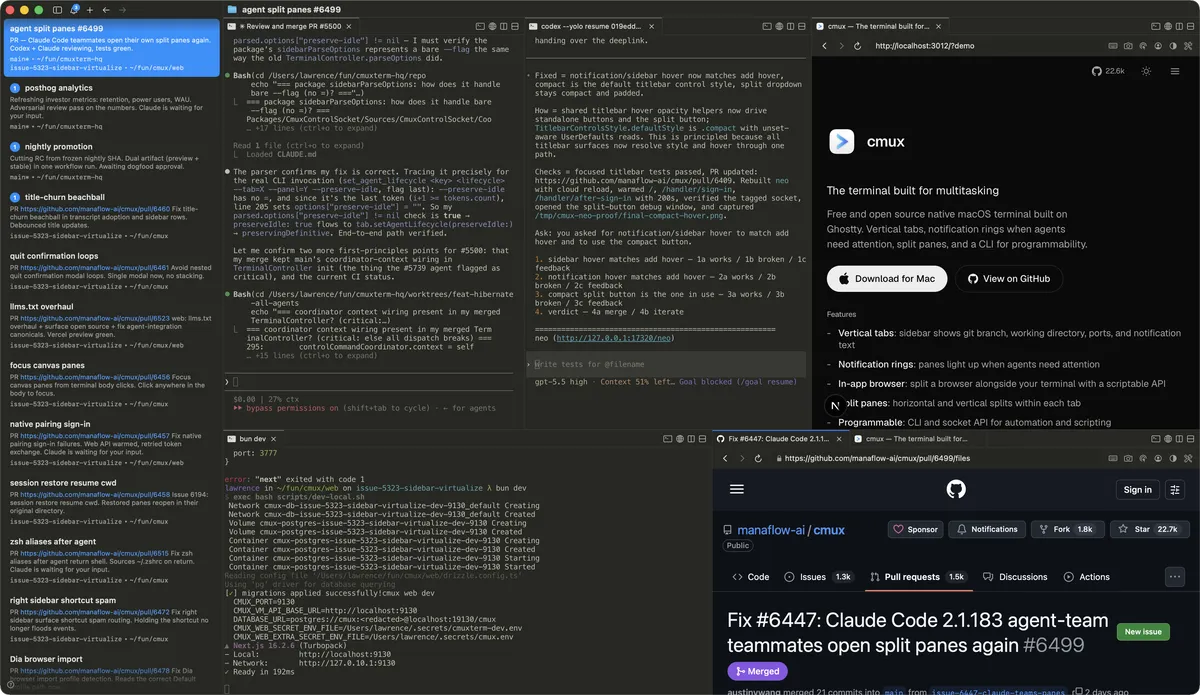
Screenshot: cmux on GitHub. Get it on GitHub
10. HandBrake
Video & Media · ⭐ 25k
In 2 of 5 lists: awesome-native-macosx-apps, jeffreyjackson/mac-apps
HandBrake converts video from one format to another. Shrink a huge screen recording, make a file play on an old TV, or turn an MKV into an MP4. Its presets mean you rarely need to touch the advanced settings.
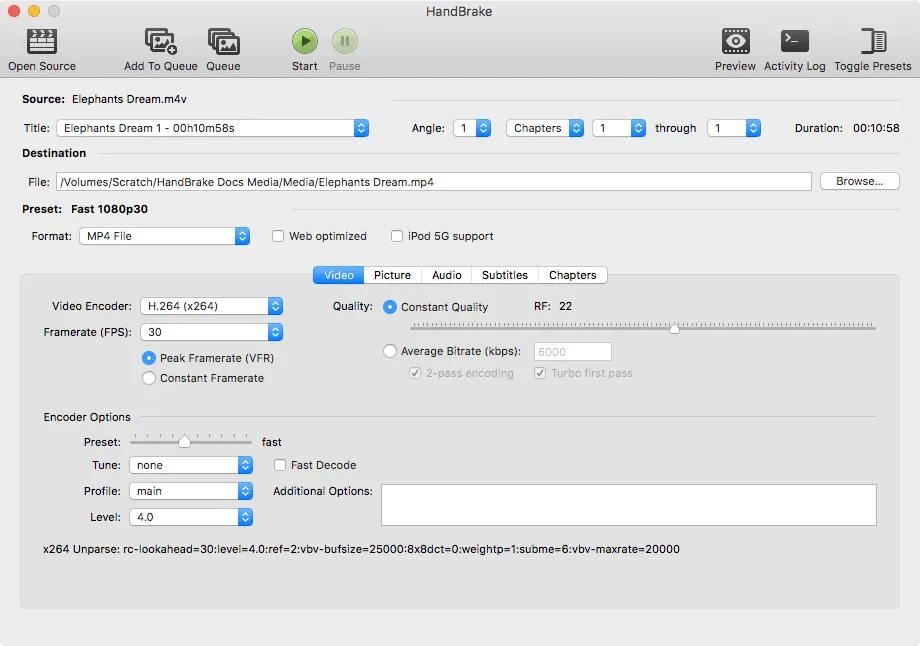
Screenshot: handbrake.fr. Get it at handbrake.fr · GitHub
11. Vorssaint Utils
Menu Bar · ⭐ 24k
In 2 of 5 lists: awesome-swift-macos-apps, awesome-mac
Vorssaint Utils puts a dozen small utilities behind one menu bar icon: a per-app volume mixer, a system monitor, window snapping, clipboard history, text snippets, and an uninstaller. You turn on only the features you want, so it can replace several separate apps.
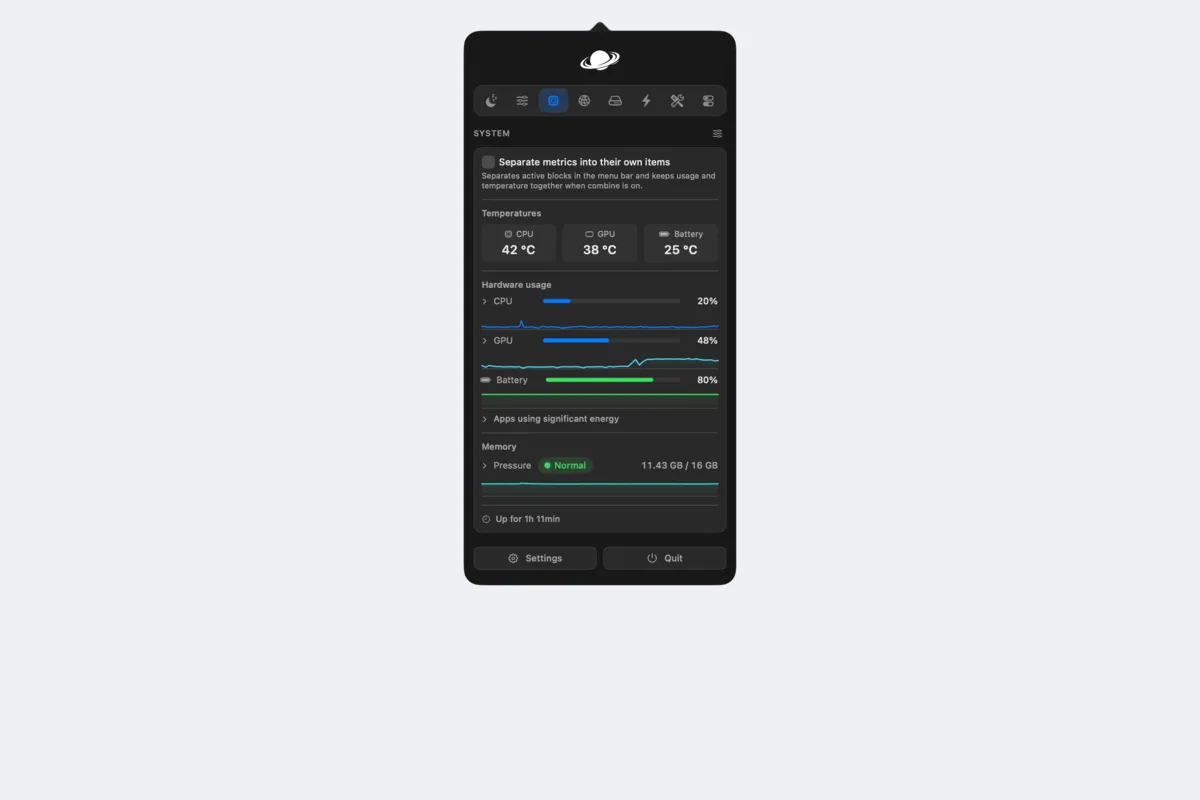
Screenshot: Vorssaint Utils on GitHub. Get it on GitHub
12. AeroSpace
Window Management · ⭐ 23k
In 1 of 5 lists: awesome-swift-macos-apps
AeroSpace is a tiling window manager inspired by i3 on Linux. Windows are arranged automatically, and you control everything from the keyboard. Unlike yabai, it does not require turning off any of macOS's security protections, which makes it the easier one to try. Install it with brew install --cask nikitabobko/tap/aerospace.
Get it on GitHub
13. CodeEdit
Code Editors · ⭐ 23k
In 3 of 5 lists: awesome-native-macosx-apps, awesome-swift-macos-apps, open-source-mac-os-apps
CodeEdit is a code editor built only for the Mac, with the look and feel of Xcode but for any language. It is still in development, so it is not a full replacement for VS Code yet, but it shows how fast and light a native editor can be.
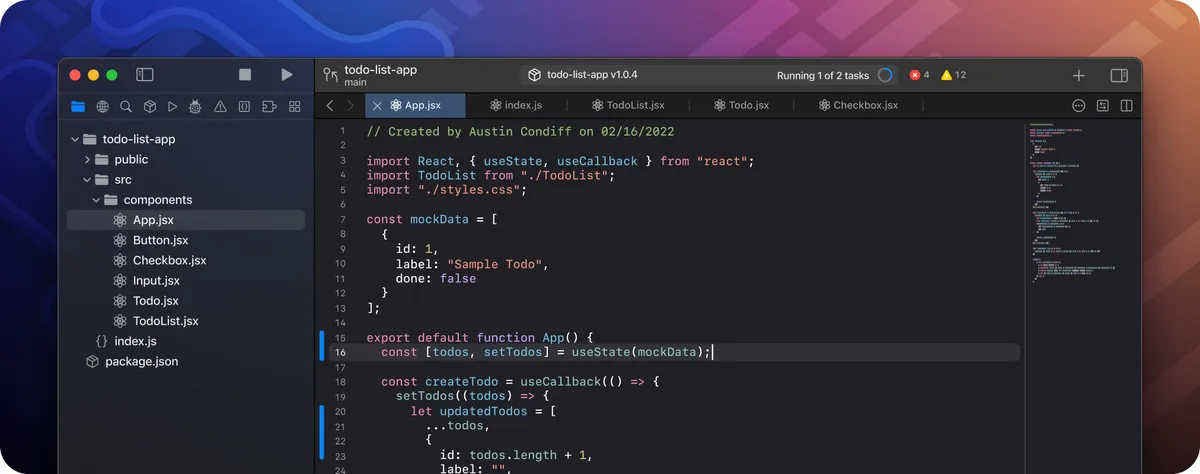
Screenshot: CodeEdit on GitHub. Get it on GitHub
14. CodexBar
AI Tools · ⭐ 22k
In 1 of 5 lists: awesome-swift-macos-apps
CodexBar shows your AI coding limits in the menu bar. If you use Claude Code, Codex, or similar tools, it shows how much of your session and weekly limit you have used and when it resets, so you know whether to start that long task now. Install it with brew install --cask codexbar.
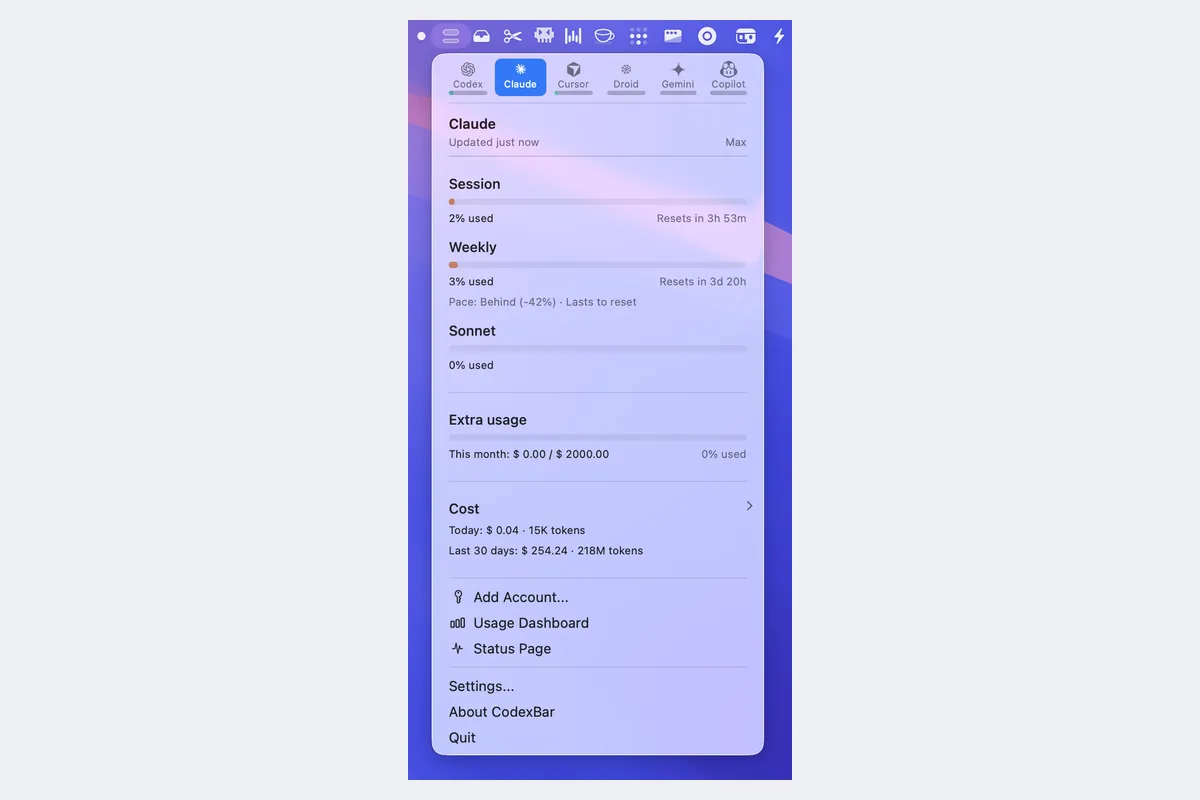
Screenshot: CodexBar on GitHub. Get it on GitHub
15. Maccy
Clipboard · ⭐ 22k
In 3 of 5 lists: awesome-native-macosx-apps, awesome-swift-macos-apps, open-source-mac-os-apps
Maccy is clipboard history for the Mac, like Win+V on Windows. Press Shift+Cmd+C, type to search, and paste anything you copied earlier. It is small, fast, and stays out of the way.
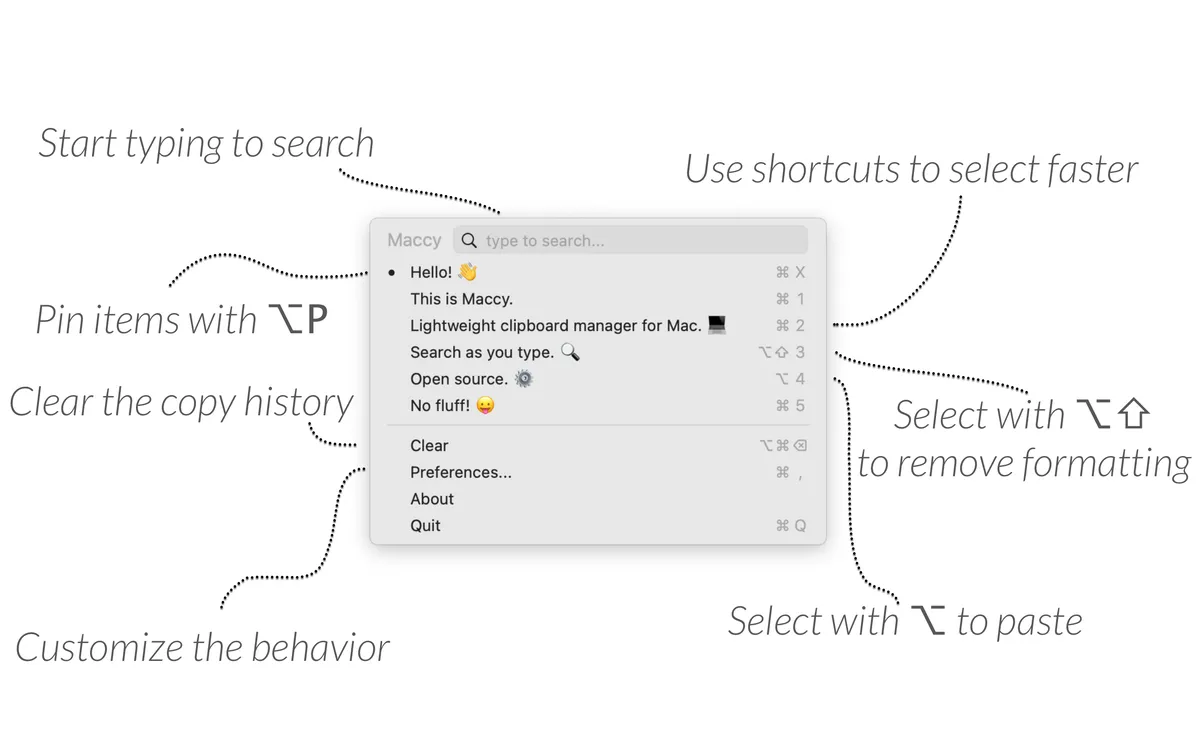
Screenshot: maccy.app. Get it at maccy.app · GitHub
16. Mos
Mouse & Trackpad · ⭐ 22k
In 2 of 5 lists: awesome-swift-macos-apps, open-source-mac-os-apps
On a Mac, a mouse wheel and the trackpad share one scroll direction setting, which drives Windows switchers crazy. Mos fixes that: you can reverse the mouse wheel on its own and add smooth scrolling. You can even set it differently for each app.
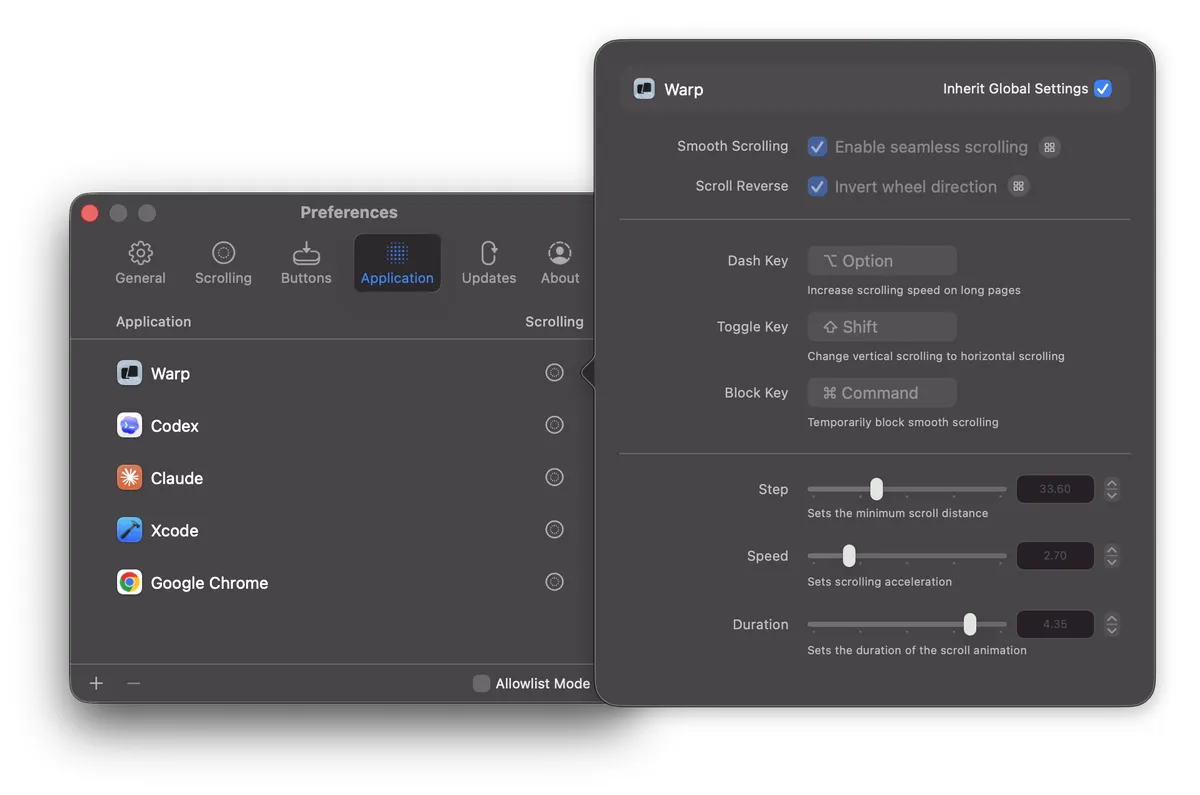
Screenshot: mos.caldis.me. Get it at mos.caldis.me · GitHub
17. Aerial
Screen Saver · ⭐ 21k
In 2 of 5 lists: awesome-swift-macos-apps, open-source-mac-os-apps
Aerial brings the Apple TV's beautiful aerial videos to your Mac's screen saver: slow drone shots of cities, coastlines, and even space. You can pick which videos play and add the time or weather on top.
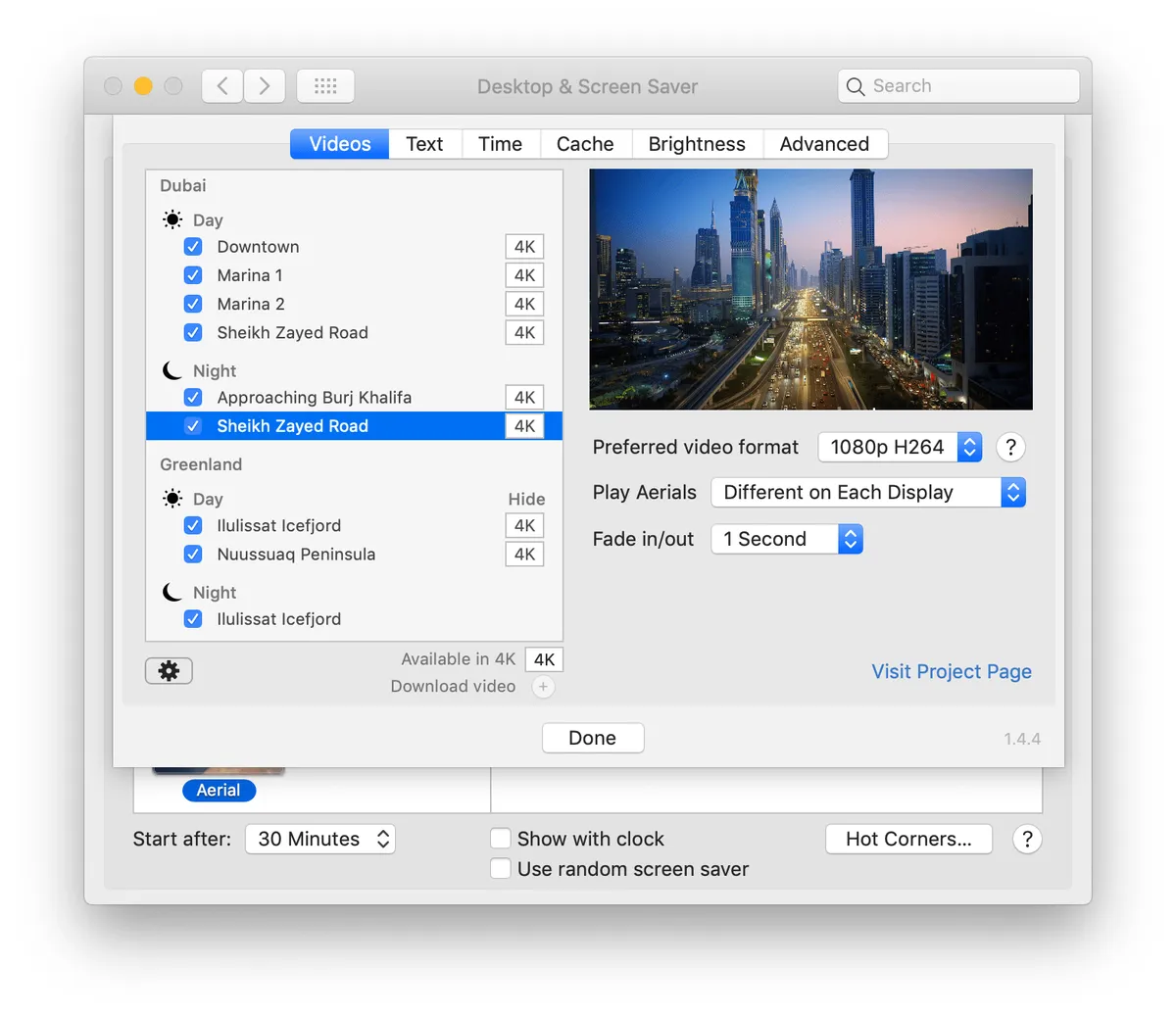
Screenshot: via open-source-mac-os-apps. Get it on GitHub
18. VLC
Video & Media · ⭐ 20k
In 1 of 5 lists: awesome-native-macosx-apps
VLC is the media player that plays everything, and the Mac version has its own native interface. If you used it on Windows, it works the same way here. IINA is the more Mac-like choice, but VLC is a safe fallback for any odd file.
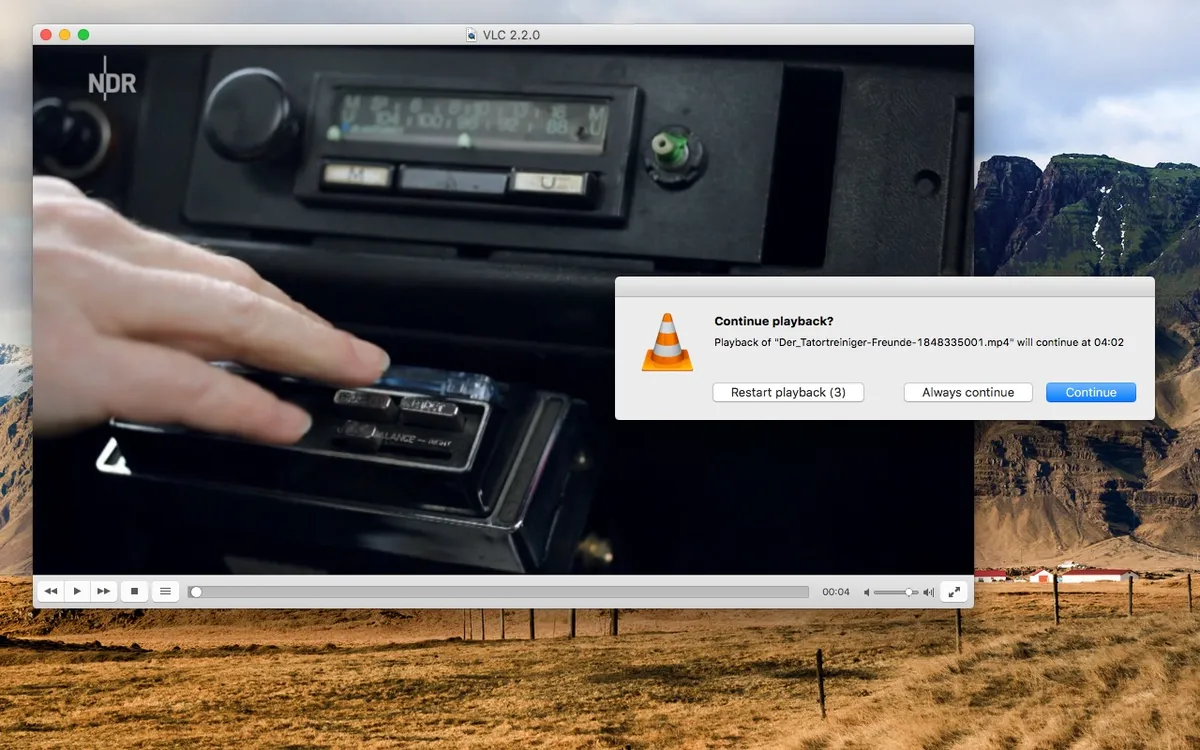
Screenshot: videolan.org. Get it at videolan.org/vlc · GitHub
19. Background Music
Audio · ⭐ 19k
In 1 of 5 lists: awesome-native-macosx-apps
Background Music adds two things the Mac is missing: a volume slider for each app, and auto-pause, which pauses your music when another app starts playing sound and resumes it after. It can also record what your Mac is playing.
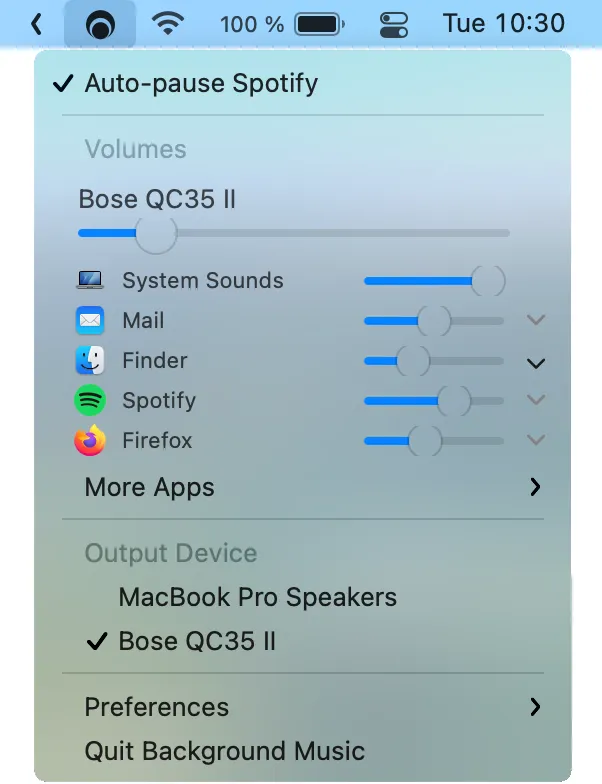
Screenshot: Background Music on GitHub. Get it on GitHub
20. iTerm2
Terminal · ⭐ 18k
In 2 of 5 lists: awesome-native-macosx-apps, open-source-mac-os-apps
iTerm2 has been the favorite Terminal replacement on the Mac for years. It adds split panes, search, a hotkey window that drops down from the top of the screen, and many small features that make the command line nicer.
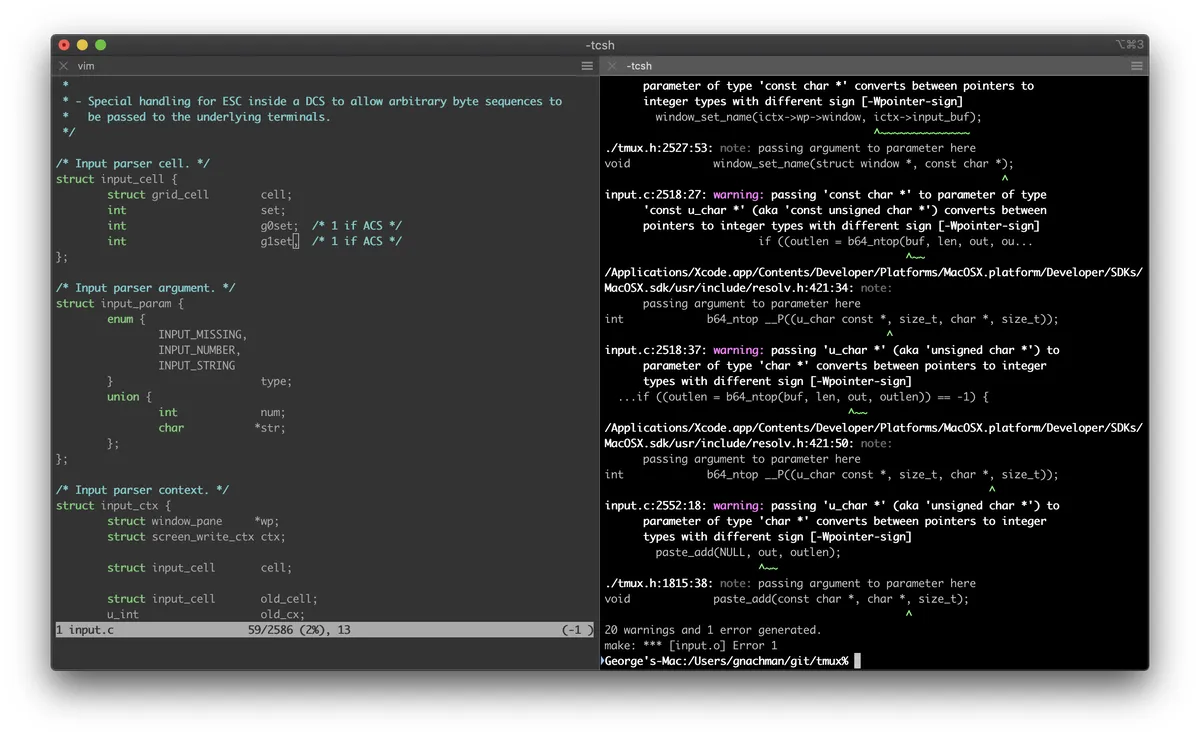
Screenshot: iterm2.com. Get it at iterm2.com · GitHub
21. OpenEmu
Games · ⭐ 18k
In 2 of 5 lists: awesome-swift-macos-apps, open-source-mac-os-apps
OpenEmu plays retro games from consoles like the NES, SNES, Game Boy, Genesis, and PlayStation, all from one library that looks like iTunes for games. Plug in a controller and it just works. You need to supply your own game files.
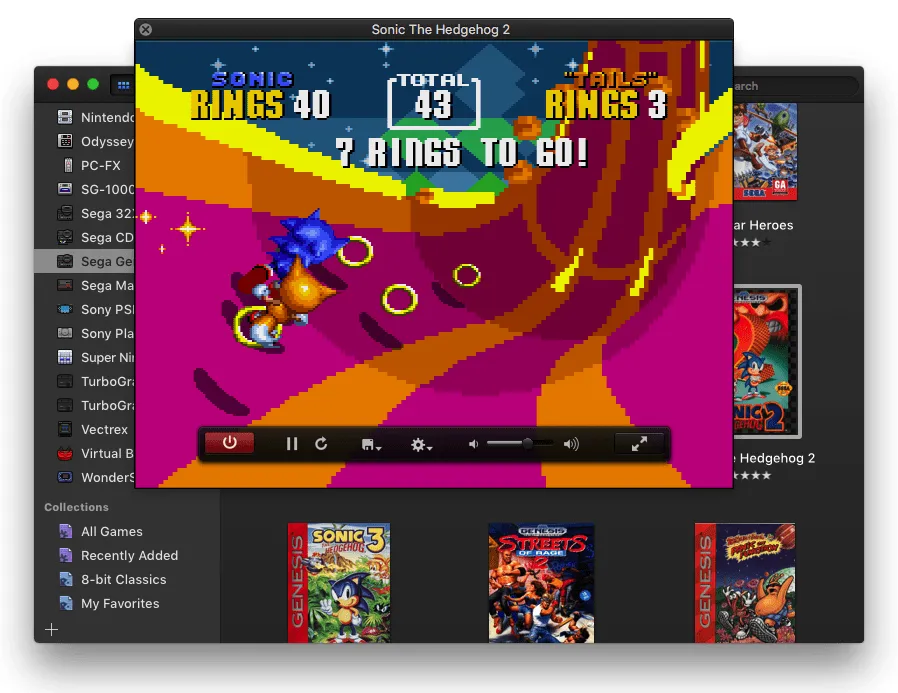
Screenshot: openemu.org. Get it at openemu.org · GitHub
22. AltTab
Window Management · ⭐ 16k
In 2 of 5 lists: awesome-swift-macos-apps, open-source-mac-os-apps
Cmd+Tab on a Mac switches between apps, not windows. AltTab brings back the Windows-style switcher, with a preview of every open window. I wrote a whole post about it.
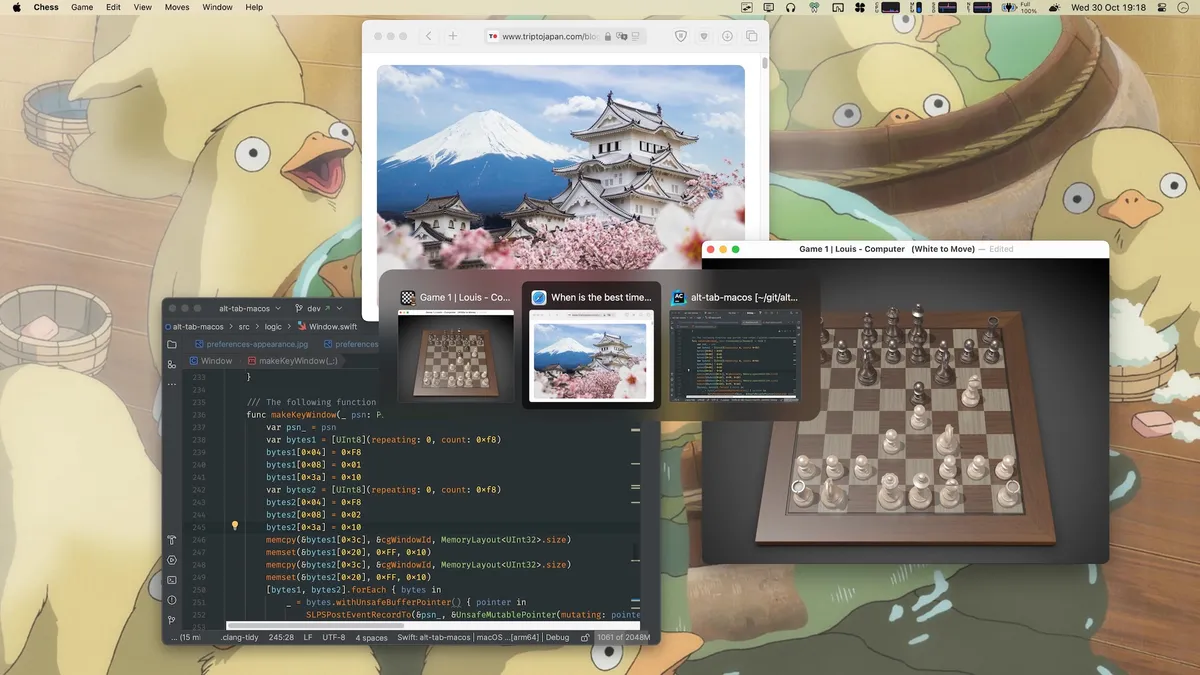
Screenshot: AltTab on GitHub. Get it at alt-tab.app · GitHub
23. Amethyst
Window Management · ⭐ 16k
In 3 of 5 lists: awesome-native-macosx-apps, awesome-swift-macos-apps, open-source-mac-os-apps
Amethyst automatically tiles your windows into neat layouts, like the Linux window manager xmonad. Unlike yabai, it needs no special setup: install it, grant permission, and choose a layout from the keyboard.
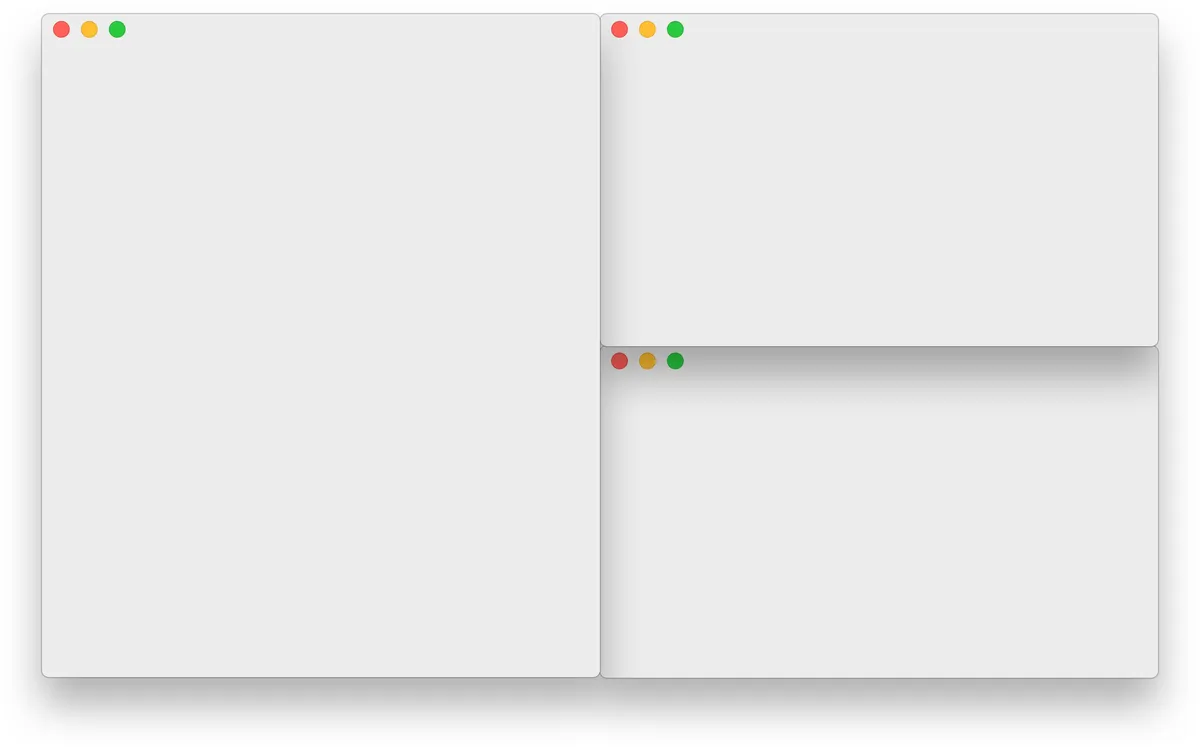
Screenshot: ianyh.com. Get it at ianyh.com/amethyst · GitHub
24. Hammerspoon
Automation · ⭐ 16k
In 1 of 5 lists: open-source-mac-os-apps
Hammerspoon lets you automate your Mac with small Lua scripts. Move windows, react when you plug in a monitor or join a Wi-Fi network, or create your own keyboard shortcuts. It has no interface of its own. You write a config file, so it is for people who like to tinker.
Get it at hammerspoon.org · GitHub
25. Hidden Bar
Menu Bar · ⭐ 15k
In 3 of 5 lists: awesome-native-macosx-apps, awesome-swift-macos-apps, open-source-mac-os-apps
Menu bar icons pile up fast, especially after installing apps from a list like this one. Hidden Bar lets you tuck the ones you rarely use behind an arrow, and show them again with one click.
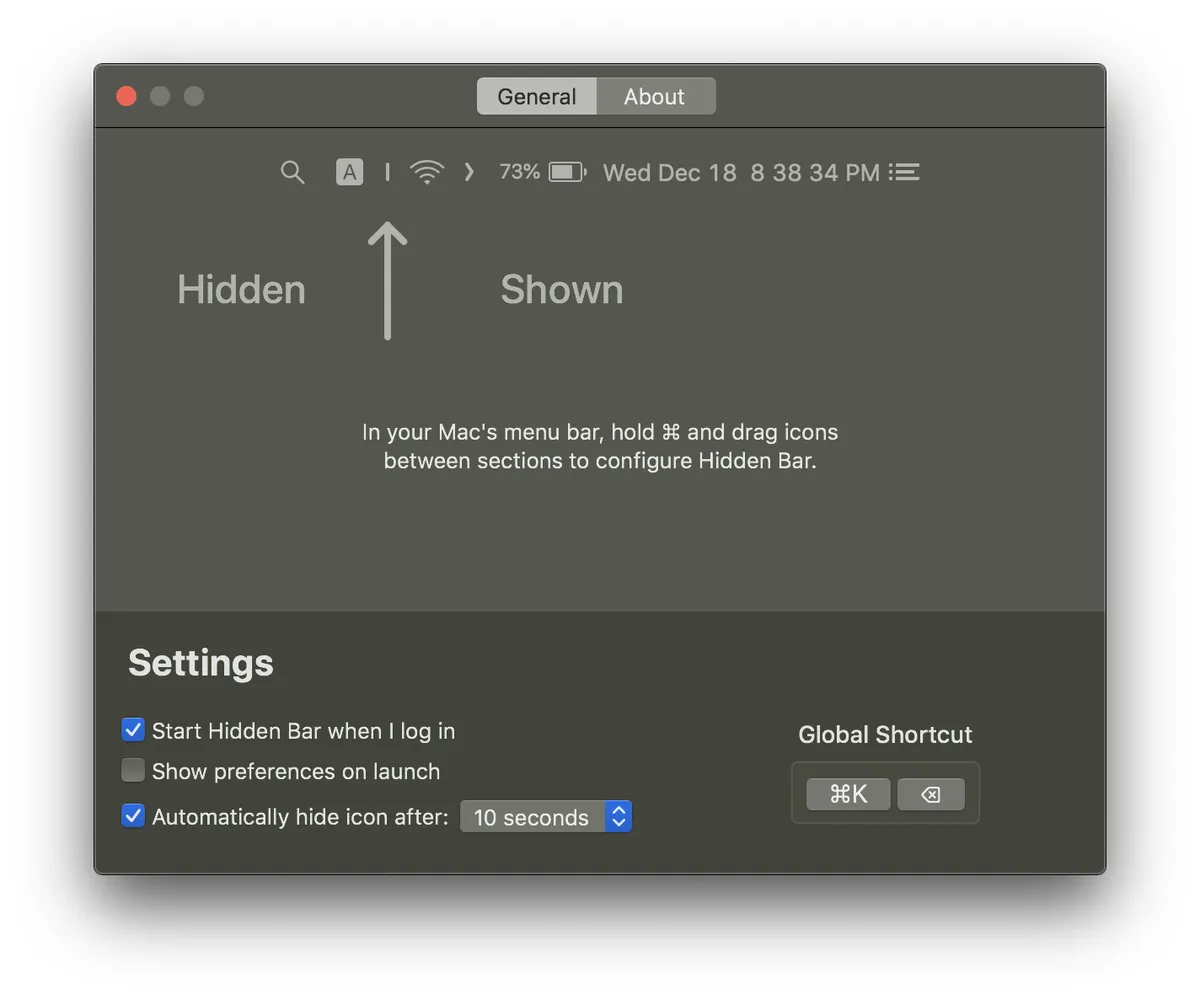
Screenshot: Hidden Bar on GitHub. Get it on GitHub
Closed-source favorites
Here are the top ten closed-source native apps from these lists installed most often in the past year, according to Homebrew's public install numbers.
- Raycast · Free + paid plans · 116k Homebrew installs: a launcher that replaces Spotlight, with clipboard history, window management, snippets, and AI. I wrote a whole post about it.
- AppCleaner · Free · 49k Homebrew installs: drag an app onto it to delete the app along with its leftover files. More in my post on uninstalling Mac apps.
- TablePlus · Paid · 29k Homebrew installs: a fast database app for PostgreSQL, MySQL, SQLite, and more. The free version has limits.
- Shottr · Free · 26k Homebrew installs: a fast screenshot tool with scrolling capture, text recognition, and annotation.
- Alfred · Free + paid Powerpack · 24k Homebrew installs: a launcher and Spotlight replacement. The paid Powerpack adds workflows, clipboard history, and snippets.
- The Unarchiver · Free · 23k Homebrew installs: opens almost any archive file, including rar and 7z.
- Sourcetree · Free · 16k Homebrew installs: a visual Git app from Atlassian.
- OnyX · Free · 14k Homebrew installs: runs maintenance tasks, clears caches, and unlocks hidden settings.
- Proxyman · Free + paid plans · 14k Homebrew installs: inspects the network traffic of apps and websites, mainly for developers.
- BetterTouchTool · Paid · 13k Homebrew installs: customizes your trackpad, mouse, and keyboard with your own gestures and shortcuts.
Other GitHub lists worth checking
These lists are worth a bookmark too:
- awesome-mac (⭐ 115k): the biggest curated list of Mac apps, free and paid, with over 1,300 entries. I picked the 25 most-starred apps from it.
- open-source-mac-os-apps (⭐ 51k): only open-source Mac apps, with screenshots and the programming language for each one. I picked the 25 most-starred apps from it.
- iCHAIT/awesome-macOS (⭐ 19k): a smaller, hand-picked list of free and paid Mac apps, plus setup guides. I picked the 25 most-starred apps from it.
- awesome-swift-macos-apps (⭐ 1.7k): open-source Mac apps written in Swift, from the same maintainer as awesome-mac.
- awesome-native-macosx-apps (⭐ 1.6k): native Mac apps only, free and paid, nothing built on Electron.
- jeffreyjackson/mac-apps (⭐ 1.6k): a long-running list of open-source Mac apps, with Swift projects marked.
One more thing
You do not need all 25. Pick the two or three that fix something that annoys you today, and come back to the list when something else does.
Also check out the apps I actually run day to day.
Frequently asked questions
What is a native Mac app?
A native Mac app is built with Apple's own tools, like Swift, Objective-C, AppKit, or SwiftUI, instead of web technology like Electron. Native apps usually start faster, use less memory and battery, and follow Mac conventions for menus, shortcuts, and settings.
How can I tell if a Mac app is built with Electron?
In Finder, right-click the app in Applications, choose Show Package Contents, and open Contents, then Frameworks. If you see Electron Framework.framework, the app is built with Electron rather than as a native Mac app.
What is the most-starred native Mac app on GitHub?
Across the five GitHub lists in this post, the most-starred native Mac app is IINA, a video player with about 47,000 stars as of October 2026. Stats (42,000) and UTM (36,000) come next.
Are native Mac apps free?
All 25 apps in the main list are open source and free. Many popular native apps are paid or closed source, such as TablePlus and BetterTouchTool, and some, like Raycast and Alfred, are free with paid upgrades.